Yes, you can monitor your home CCTV cameras from your mobile phone using a compatible mobile application and an internet connection. Modern CCTV systems allow homeowners
Can I Monitor My Home CCTV Cameras from My Mobile Phone?
Yes, you can monitor your home CCTV cameras from your mobile phone using a compatible mobile application and an internet connection. Modern CCTV systems allow homeowners to view live camera footage, check recorded videos, receive motion alerts, and monitor their properties remotely.
Whether you have installed HD CCTV cameras, IP cameras, or wireless WiFi security cameras, many systems support smartphone monitoring. This feature is particularly useful when you are travelling, working outside your home, or managing a property from another location.
For homeowners in Lahore, mobile CCTV monitoring provides a convenient way to check important areas such as main entrances, parking spaces, gates, and outdoor surroundings.
In this guide, we explain how mobile CCTV viewing works, what equipment you need, how to connect your cameras to a smartphone, and how to solve common remote-viewing problems.
Can I View My Home CCTV Cameras on My Mobile Phone?
Yes. Most modern DVR, NVR, and WiFi CCTV systems support mobile viewing through compatible applications.
These applications allow you to connect your smartphone to your security camera system and access its video feed remotely.
Depending on your camera model and application, you may be able to:
- Watch live CCTV footage from anywhere with internet access.
- View previously recorded videos.
- Receive motion detection notifications.
- Monitor multiple cameras from one application.
- Capture screenshots of important events.
- Adjust supported camera settings remotely.
- Use two-way audio with compatible cameras.
For example, if you install CCTV cameras at your house in Lahore, you can check the live camera feeds while travelling to another city or working outside your home.
However, remote viewing requires correct configuration, compatible equipment, and a working internet connection at the property.
What Do You Need to Monitor CCTV Cameras on Your Mobile?
Before connecting your home CCTV system to a smartphone, make sure you have the necessary equipment.
| Required Equipment | Purpose |
|---|---|
| CCTV Cameras | Capture video footage |
| DVR or NVR | Manage and record camera footage |
| Internet Connection | Enable remote access |
| WiFi Router | Connect compatible network devices |
| Smartphone | Access live and recorded videos |
| Mobile Application | Connect your phone to the CCTV system |
If you use standalone WiFi cameras, you may not need a separate DVR or NVR because some models record directly to a microSD card or cloud storage.
For traditional HD CCTV systems, a compatible DVR is generally required for centralized recording and remote access.
How to Connect CCTV Cameras to Your Mobile Phone
The connection process depends on your camera brand and recording device. However, most modern CCTV systems follow a similar setup process.
Step 1: Connect Your CCTV System to the Internet
First, connect your DVR or NVR to your internet router using an Ethernet cable.
For WiFi-enabled recording devices, you may also be able to connect through a wireless network.
Make sure your router has an active internet connection and the recorder is properly configured.
Step 2: Install the Compatible Mobile Application
Download the official mobile application recommended by your CCTV camera or recorder manufacturer.
Different brands use different applications. For example:
- Hikvision: Hik-Connect
- Dahua: DMSS
- IMOU: Imou Life
- TP-Link Tapo: Tapo App
Always verify the correct application through the manufacturer’s official website or app store listing.
Step 3: Create an Account or Sign In
Open the mobile application and create an account if required.
Some applications also support local device access, depending on the product and configuration.
Use a strong password and enable additional account protection where available.
Step 4: Add Your CCTV Camera or Recorder
Most applications provide an option to add a new device.
You may need to scan a QR code displayed on your DVR, NVR, or camera.
Depending on the system, you may also need to enter the device serial number, verification code, or login credentials.
Follow the manufacturer’s instructions to complete the pairing process.
Step 5: Start Live Viewing
Once the device has been successfully added, open the live-view section of the application.
You should be able to see connected camera feeds on your smartphone.
You can select individual cameras or use a multi-camera viewing option if your application supports it.
Step 6: Test Remote Access
Disconnect your smartphone from the home’s WiFi network and use mobile data to test the connection.
If the camera feeds load successfully, your remote viewing setup is working.
Testing with a different network helps confirm that the system is accessible outside your home network.
Which CCTV Camera Brands Support Mobile Viewing?
Many popular CCTV brands provide mobile applications for remote monitoring. However, supported features depend on the specific camera or recorder model.
Hikvision CCTV Cameras
Hikvision offers mobile monitoring through its Hik-Connect application for compatible devices.
Users can access live video, playback, and supported notifications through their smartphones.
Dahua CCTV Cameras
Dahua provides the DMSS application for compatible CCTV systems.
It supports mobile monitoring, video playback, and other features depending on the connected recorder or camera.
IMOU WiFi Security Cameras
IMOU cameras are designed for convenient smartphone monitoring through the Imou Life application.
Depending on the model, users may access features such as:
- Live video streaming.
- Motion detection alerts.
- Two-way audio.
- Night vision.
- SD card recording.
- Remote camera controls.
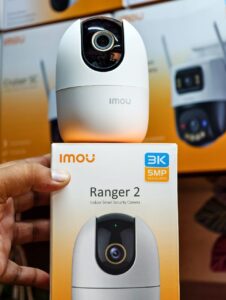
Models such as IMOU Ranger 2 and IMOU Cruiser are commonly considered for indoor and outdoor residential monitoring.
Before purchasing, check the exact model specifications to confirm supported features.
Can I Monitor CCTV Cameras Without WiFi?
Yes, but it depends on what type of monitoring you need.
There is an important difference between local CCTV recording and remote mobile viewing.
Local recording: A DVR or NVR can continue recording footage without an internet connection, provided the cameras, recorder, and power supply are working correctly.
Remote mobile viewing: To access your cameras from outside the property, the CCTV system generally needs an active internet connection.
For example, if your home internet stops working, your connected DVR may continue saving footage to its hard drive. However, you may temporarily lose remote access through your smartphone.
Some systems also support local network viewing without internet when your phone and CCTV equipment are connected to the same network.
What Internet Speed Is Required for Mobile CCTV Viewing?
The internet speed required depends on several factors, including camera resolution, video compression, number of cameras, and streaming quality.
A single camera streaming at a lower resolution generally requires less bandwidth than multiple cameras streaming in high definition.
Consider these factors when choosing an internet package:
- Number of connected cameras.
- Camera resolution, such as 2MP, 4MP, or 5MP.
- Video compression technology.
- Number of simultaneous mobile viewers.
- Upload speed available at the property.
- Internet stability and network congestion.
For remote CCTV monitoring, upload speed is particularly important because your home network sends video footage to your smartphone.
A stable connection is often more useful than simply choosing a high-speed internet package.
Why Are My CCTV Cameras Not Showing on My Mobile Phone?
Sometimes CCTV cameras may stop displaying video on a smartphone even when the system was previously working correctly.
This issue can occur because of internet interruptions, incorrect settings, outdated applications, or device connectivity problems.
Here are some common causes and possible solutions.
| Common Problem | Possible Solution |
|---|---|
| No internet connection | Check your router and internet service |
| Device shows offline | Restart the router and check recorder connectivity |
| Incorrect login details | Verify your username and password |
| Camera feed not loading | Check camera and recorder connections |
| App not working properly | Update the official mobile application |
| Weak WiFi signal | Improve router placement or network coverage |
| Incorrect device configuration | Review remote access settings |
If the problem continues, check the manufacturer’s troubleshooting instructions or contact a qualified CCTV technician.
Avoid sharing your device passwords or verification codes with unauthorized people.
How to Secure Your CCTV Mobile Viewing System
Remote monitoring makes home surveillance convenient, but protecting your CCTV system from unauthorized access is equally important.
Follow these security recommendations:
1. Use Strong Passwords: Avoid simple passwords and change default device credentials.
2. Update Device Firmware: Install official firmware updates when available to address security and performance issues.
3. Use Official Applications: Download CCTV applications from trusted sources and avoid unknown third-party software.
4. Enable Two-Factor Authentication: Use additional account protection where supported.
5. Limit User Access: Give viewing permissions only to trusted family members or authorized users.
6. Secure Your WiFi Router: Use a strong WiFi password and modern supported network security settings.
7. Protect Your Privacy: Position cameras to monitor your own property without unnecessarily recording neighbours or private spaces.
These steps help protect your video footage and reduce the risk of unauthorized access.
Professional CCTV Mobile Viewing Setup in Lahore
Connecting CCTV cameras to a mobile phone may seem simple, but incorrect network configuration can cause connection failures and remote viewing problems.
Professional CCTV installation helps ensure that your cameras, recording devices, internet connection, and mobile application work together correctly.
At Lahore Safecam Solutions, we help residential and commercial customers explore suitable CCTV security systems according to their monitoring requirements.
Our CCTV solutions include:
- HD CCTV camera installation.
- IP network camera installation.
- Wireless WiFi security cameras.
- DVR and NVR configuration.
- Mobile CCTV viewing setup.
- Indoor and outdoor security cameras.
- CCTV maintenance and troubleshooting.
Whether you want to monitor two cameras at home or connect a complete multi-camera surveillance system, selecting compatible equipment is important.
A properly configured system allows you to check live video, access supported recordings, and monitor important areas through your smartphone.
If you are planning to install a new CCTV system or experiencing mobile viewing problems, contact Lahore Safecam Solutions for professional guidance.
Frequently Asked Questions (FAQs)
1. Can I monitor my home CCTV cameras from my mobile phone?
Yes. Most modern CCTV systems support smartphone monitoring through compatible mobile applications. You can access live video and recorded footage remotely when the system is correctly configured and connected to the internet.
2. Can I view CCTV cameras from anywhere in the world?
Yes. Compatible CCTV systems support remote viewing from different locations through an internet connection. Your home CCTV equipment must have internet access, and your mobile application must be properly configured.
3. Which app is used to view CCTV cameras on a mobile phone?
The application depends on your CCTV brand. Hikvision uses Hik-Connect, Dahua supports DMSS, and IMOU cameras use Imou Life. Other brands have their own applications.
4. Can I view multiple CCTV cameras on one mobile phone?
Yes. Many DVR, NVR, and CCTV applications allow users to view multiple connected cameras through a single smartphone. The number of simultaneous video feeds depends on the device and application.
5. Can I watch CCTV cameras without an internet connection?
You can generally view cameras locally if your phone and CCTV equipment are connected to the same local network. However, remote viewing from outside your property normally requires internet access.
6. Can I view CCTV recordings on my smartphone?
Yes. Many compatible DVRs, NVRs, and WiFi cameras support remote playback. You can select a date and time to review available recorded footage.
7. Why does my CCTV camera show offline on my mobile?
Common reasons include internet interruptions, router problems, incorrect network configuration, power failures, or device connectivity issues. Checking the internet connection and restarting the equipment may help resolve the problem.
8. Does mobile CCTV viewing require a monthly subscription?
Not always. Many DVR and NVR systems offer remote viewing without a monthly mobile-viewing subscription. However, some manufacturers charge for optional cloud storage or advanced services.
Conclusion
Monitoring home CCTV cameras from a mobile phone is a convenient way to keep track of your property when you are away. Modern HD cameras, IP cameras, and wireless WiFi security systems offer different remote-viewing options according to their features and compatibility.
To enjoy reliable mobile monitoring, choose compatible cameras, configure your DVR or NVR correctly, maintain a stable internet connection, and secure your mobile application.
If you need professional CCTV installation or mobile viewing configuration in Lahore, Lahore Safecam Solutions can help you explore suitable security options for your home or business.
A properly installed and configured CCTV system makes remote monitoring easier while helping you stay informed about activities around your property.